CAT 2.1
CAT Studio Enhancements
You guys did a great job providing us feedback. Thank you! We are happy to announce lots of small improvements in CAT Studio.
Duplicate a Test
Duplicating an existing test was by far the most required enhancement. Now it is easy, both from the context menu and using a keyboard shortcut Ctrl+Shift+D. Instead of copying tens of values to a new test, do it with one click.

Run Tests
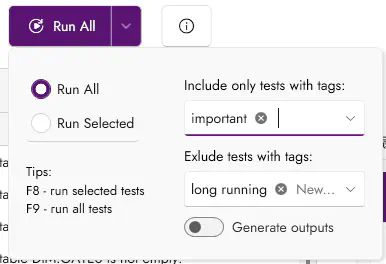
The test-running experience is now complete in CAT Studio. You can run tests containing selected tags, exclude tests with some tags or skip generation of any outputs (e.g., don’t save any test results to a database table):
Keyboard Shortcuts
CAT Studio now has the usual keyboard shortcuts like other apps, such as Ctrl+O for opening a project file, Ctrl+N for a new file, etc.
Most test-running operations can now be started with only a single F-key press, such as run current query (F5), run current test (F4), run selected tests (F8), run all tests (F9).
The keyboard shortcuts are context-aware, so Ctrl+N creates a new project if you don’t have one, a new data source when you are on the Data sources page, a new test on the Tests page, etc.
See the complete list of keyboard shortcuts.
Other Improvements
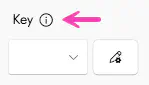
For less intuitive settings, there is a new “help icon” leading to our documentation. Visible only when you hover over the control.
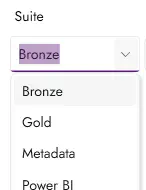
We added suggestions to many test fields. For example, once you use some value in the Suite field, it is available to pick in other tests too:
And some other improvements. The grid with tests now has a context menu, click anywhere in the tests grid to see it. More space for tags. And so on.
Composite Keys for Sets Comparisons
CAT does NOT require specifying a key column when you are comparing two data sets (possibly from even two different systems). But when you DO provide it, you get a much better sample of erroneous data. Keys have been supported for a very long time already, so what is new then?
Based on your feedback, we introduced many improvements:
- Composite keys are now supported. Use as many columns as you want, separated by a comma or semicolon.
Example:
CompanyID, PersonID - Ordinal positions can be used, you don’t need to copy long column names. You can even mix them with names. Examples:
1,2, 3, 1 - CAT doesn’t require the same data type on both sides anymore. Do you have
inton one side andbiginton the other? No problem. - Handy “shortcuts” are supported:
First is KeyorAll Except Last. - Error message now contains a warning when the key is not unique or the returned set is not sorted based on the key.
Skip Output
Many users complained that they don’t want to create defined outputs, such as streaming test results to a database table, when they run tests ad hoc. Commenting out the output is not the solution, as you can accidentally commit such change.
You can now run tests while skipping generation of any file/database outputs. CAT Studio now has this behavior by default (you see the results there immediately anyway). In command-line tools, you now have the option to skip generation of all outputs like this:
# in PowerShell CAT module
Invoke-CatProject -SkipOutputs
# or if you use CAT CLI:
catcli run -n # or catcli run -noOutputs
Experimental: Output Details
CAT is a “detector of problems” in your data. Therefore, it has always only provided a sample of the data that is erroneous, not all of it. Up to 50 such records in the sample are enough for troubleshooting. Some users requested export of all the data that broke a rule defined in your test.
As a new experimental feature, we support output of all erroneous data for the set is empty expectation and for SQL Server output. Test definition has a new property Output Details. If that is true, the expectation is set is empty and the test works with SQL Server data source, CAT outputs all found data in JSON format to table Tests.TestResultDetail. In CAT Studio, you need to turn on this experimental feature in Settings.
Feedback
We moved our feedback to CAT portal: https://portal.justcat.it/#feedback
You don’t need to register - just submit any bug, feature request, question or idea. Thank you very much!
That’s it :-). Happy testing!
CAT team