How CAT works
You say CAT will test my data. OK, but how does it work?
We explained what we mean by Data Source, Test and Output. But how does it all work? How are tests evaluated and outputs created?
There are two more things you need to know about: project files and CAT tools.
Project file
CAT needs to know where is the data you want to test, what tests you want to run and what is your desired output. A project file in CAT is a very simple file that stores that information.
The project files are designed to be very easy to edit by hand. They are in YAML format. When you work with CAT Studio, you only need to know they exist, you don’t need to understand how to edit them.
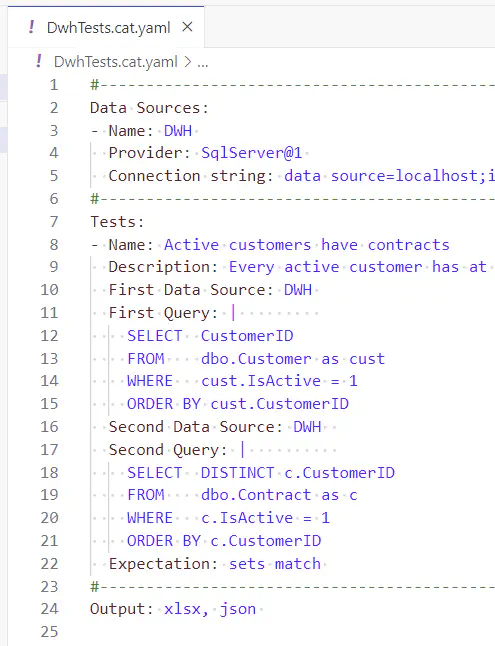
#------------------------------------------------------------
Data Sources:
- Name: DWH
  Provider: SqlServer@2
  Connection string: data source=localhost;initial catalog=DWH;integrated security=true;TrustServerCertificate=true
#------------------------------------------------------------
Tests:
- Name: Active customers have contracts
  Description: Every active customer has at least one active contract.
  First Data Source: DWH
  First Query: |
    SELECT   CustomerID
    FROM     dbo.Customer as cust
    WHERE    cust.IsActive = 1
    ORDER BY cust.CustomerID
  Second Data Source: DWH
  Second Query: |
    SELECT   DISTINCT c.CustomerID
    FROM     dbo.Contract as c
    WHERE    c.IsActive = 1
    ORDER BY c.CustomerID
  Expectation: sets match
#------------------------------------------------------------
Output: xlsx, json
The project files may contain definitions of data sources and tests directly, or they may instruct CAT to load the definitions from elsewhere (such as from MS Excel worksheet, from database etc.). Details are not important at this moment. Important is: there is a simple file that instructs CAT what tests you want to run. It is called CAT project file.
CAT tools
Different people have different preferences. Therefore we provide four simple tools that are able to work with project files:
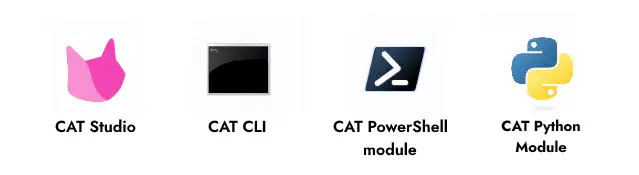
Typically CAT users only use one of the tools. The tool of your choice (they are described and compared in more detail in the next article) will do this for you:
- open / display the project content
- such as data sources, tests, outputs needed, settings
- run the tests
- connects to data sources and evaluates your data, based on the test definitions from project file
- create the desired output
- such as results of the tests in MS Excel format, JSON file or entries in a relational database table
CAT tools are running your tests
Here is a simple schema (for PowerShell module, but all tools work the same way):
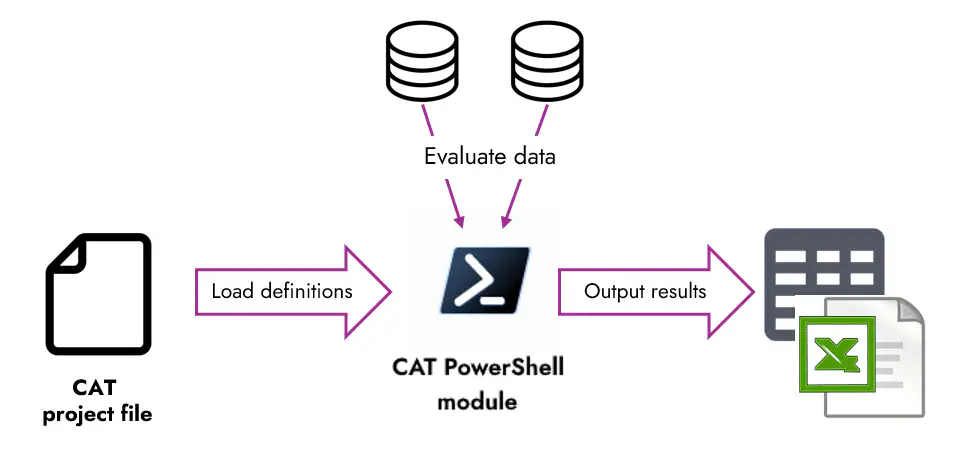
The CAT client of your choice (PowerShell module, CAT CLI, CAT Studio, CAT Python module):
-
reads the CAT project file.
-
Based on instructions in it, it runs tests against data.
-
Saves results of the tests - based on instructions in the project file, either in files in databases or in both.
The generated outputs can then be consumed by people (MS Excel), CI/CD tools like Azure DevOps (JUnit, TRX), other processes (JSON, YAML) or can be used for reporting (tables in relational databases).
The tools do NOT require admin permissions to be installed. They are installed to user’s profile.
Please also note PowerShell module, CAT CLI and Python module are very light-weight (~ 40 MB). It takes seconds to download them and install them.